
K-Tec FB Human Follow Helper — Complete Review & How-To Guide
📖 Table of Contents
- What Is K-Tec FB Human Follow Helper?
- Why Human-Like Behaviour Matters on Facebook
- Key Features — Full Breakdown
- How to Install the Extension
- How to Use — Step-by-Step Guide
- Advanced Settings Explained
- Frequently Asked Questions (FAQ)
- Final Verdict
1. What Is K-Tec FB Human Follow Helper? {#what-is-it}
K-Tec FB Human Follow Helper is a powerful Google Chrome browser extension designed to help you grow your Facebook audience by automatically following users — all while mimicking the natural, organic behaviour of a real human being.
Unlike cheap, generic bots that click buttons as fast as possible and get accounts flagged within hours, K-Tec FB Human Follow Helper is engineered from the ground up with intelligent human-simulation technology. It randomises scroll speeds, introduces natural pauses, simulates realistic mouse movements, and even takes “fatigue breaks” — just like a real person would.
Whether you are a content creator, social media marketer, business owner, or influencer trying to grow your Facebook page or profile following, this extension gives you a smart, automated edge while keeping your account safe.
2. Why Human-Like Behaviour Matters on Facebook {#why-human-like}
Facebook’s algorithm and security systems are constantly watching for bot-like patterns. Actions that happen too fast, too frequently, or without natural pauses are flagged almost immediately — leading to:
- Temporary account restrictions
- Shadowbanning
- Permanent account suspension
The K-Tec FB Human Follow Helper solves this by introducing deliberate randomness at every step. Delays between actions are never fixed — they are randomly generated within safe ranges. Scroll distances vary. Even the click itself simulates a real pointer interaction (hover → press → release) rather than a simple programmatic .click().
This is not just a convenience tool — it is a safety-first automation system.
3. Key Features — Full Breakdown {#key-features}
🤝 Feature 1: Human-Like Auto Following
The core of the extension is its intelligent follow engine. When you start a session, it:
- Scrolls through the Facebook page gradually, just as a human would
- Detects all visible “Follow” buttons on-screen
- Randomly skips ~20% of buttons to avoid a perfect, robotic pattern
- Simulates a full human click: pointer hover → mouse-down → focus → mouse-up → click
- Waits a randomised delay of 6–30 seconds between each follow action
This multi-layered randomisation is the key reason K-Tec stays safe where other tools fail.
⚙️ Feature 2: Configurable Session Limits
You are always in control. The “Max Follows per Session” field lets you set exactly how many people you want to follow in a single session — from 1 to 500.
This is critical for staying within safe daily limits. Most experienced social media marketers recommend starting with 20–40 follows per day and gradually increasing as your account builds trust. The extension respects this completely.
⏳ Feature 3: Smart Page Rotation System
One of the most unique features of K-Tec FB Human Follow Helper is its multi-URL page rotation system.
You can configure multiple Facebook page URLs (e.g., different public group pages, profile pages, or search result pages). The extension automatically:
- Works on the first URL for a set number of minutes (configurable)
- Rotates to the next URL in your list
- Continues until the session’s follow target is reached
The rotation timer even includes a ±15% random jitter — so it never rotates at the exact same predictable time, further defeating detection.
Why is this important? Staying on a single page for too long is a major bot signal. Rotating across pages mimics the natural browsing behaviour of a real user who visits multiple pages during a session.
💬 Feature 4: Comment Follower Mode
This is a premium, advanced feature that sets K-Tec apart from every other Facebook follow tool available.
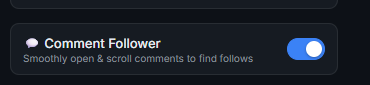
When Comment Follower Mode is enabled, the extension doesn’t just follow people on the main feed — it actively:
- Finds posts with comments
- Opens the comment section smoothly (just like a human would click on it)
- Automatically sorts comments by “All Comments” or “Newest” to maximise exposure to unique users
- Scrolls through the comment section
- Follows all users it finds within those comments
- Closes the comment section and moves on
This means you can extract followers from highly engaged posts — people who are already active and interacting on Facebook, making them far more likely to follow you back.
The extension limits itself to 8 follows per post’s comment section to avoid suspicious patterns.
⚡ Feature 5: Auto-Start Mode
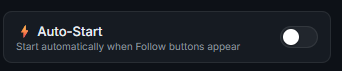
Enable the Auto-Start toggle and the extension will automatically begin following as soon as it detects Follow buttons on a Facebook page — without you needing to press the Start button every time.
This is perfect for a set-and-forget workflow: open Facebook, and the extension immediately gets to work.
📊 Feature 6: Real-Time Stats Dashboard
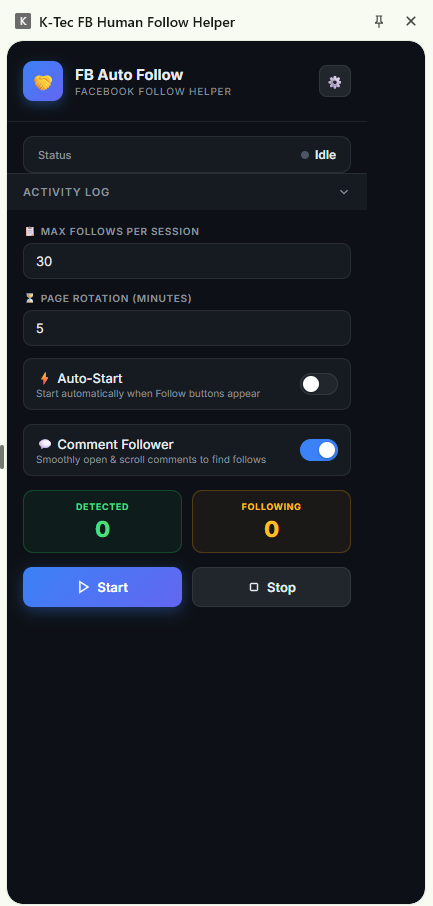
The extension’s popup shows a live statistics dashboard with two key counters:
| Stat | What It Means |
|---|---|
| Detected | Total “Follow” buttons found on the current page |
| Following | Number of people followed so far in the current session |
These numbers update in real time as the extension works, so you always have full visibility into what is happening.
📈 Feature 7: Live Session Progress Bar
Below the stats, a smooth animated progress bar shows your session completion percentage. At a glance, you can see X / 30 follows completed along with the visual bar filling up.
📋 Feature 8: Activity Log (Live Feed)
The collapsible Activity Log panel gives you a detailed, real-time log of every action the extension performs. You can see:
- Which user was followed
- When the extension is scrolling
- When it is taking a human break
- When it is opening a comment section
- Any delays or waits in progress
This is invaluable for monitoring the extension’s behaviour and making sure everything is running correctly.
😴 Feature 9: Fatigue Logic (Anti-Detection System)
One of the most sophisticated features hidden inside the extension is fatigue logic.
As a session progresses, the extension gradually increases the delay between actions — simulating the natural slowdown of a real human who gets tired over time. Every minute of the session adds approximately 5% more wait time between follows.
Additionally, every 6–10 follows, the extension takes a longer “human break” of 12–25 seconds — mimicking someone pausing to read their feed, check notifications, or simply rest.
This progressive behaviour makes the automation pattern virtually indistinguishable from a real user.
🔄 Feature 10: Intelligent Feed Sorting
Before starting any follow session, the extension automatically checks and switches the feed sort order to “Recent Activity”. This ensures you are always seeing the freshest, most active users on the page — maximising the quality of your new followers.
🔌 Feature 11: Safe Extension Reload Handling
If Chrome reloads the extension (which can happen when you update it or Chrome restarts), K-Tec FB Human Follow Helper gracefully shuts down all running processes without throwing errors or leaving the page in a broken state. A background heartbeat monitor detects the extension reload and cleanly aborts everything within 3 seconds.
🔐 Feature 12: License & Activation System
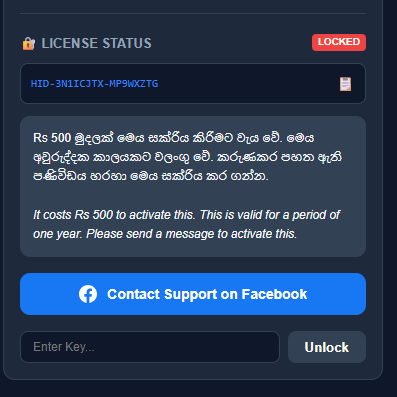
The extension uses a device-specific license system to protect against unauthorised sharing. Each installation generates a unique Device ID. You activate the extension by:
- Copying your Device ID from the Settings page
- Contacting K-Tec support on Facebook
- Receiving your unique activation key
- Entering the key in the Settings page
Pricing: Rs 500 for a full year of access — exceptional value for a tool of this capability.
4. How to Install the Extension {#installation}
Since K-Tec FB Human Follow Helper is a privately distributed extension (not listed on the Chrome Web Store), you install it in Developer Mode:
Step-by-Step Installation
Step 1: Open Google Chrome and go to:
chrome://extensions/
Step 2: Enable “Developer Mode” using the toggle in the top-right corner.
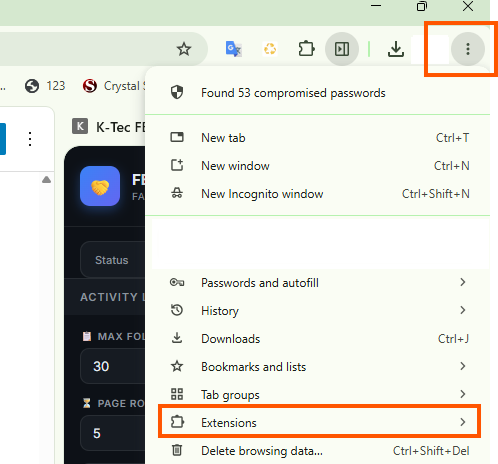
Step 3: Click “Load Unpacked”.
Step 4: Browse to the folder where the K-Tec FB Human Follow Helper files are saved and click “Select Folder”.
Step 5: The extension will appear in your Chrome extensions list. You should see the K-Tec icon in your browser toolbar.

Step 6: Click the extension icon in the toolbar. If Chrome prompts you to open it as a Side Panel, select that option for the best experience.
5. How to Use — Step-by-Step Guide {#how-to-use}
Once installed and activated, here is exactly how to run your first follow session:
🚀 Running Your First Session
Step 1 — Navigate to Facebook
Open facebook.com in Chrome and go to the page you want to work from. This could be:
- A public group page
- A page’s follower list
- A search results page for people
Step 2 — Open the Extension
Click the K-Tec icon in the toolbar (or press the side panel button). The extension popup/panel will open.
Step 3 — Configure Max Follows
In the “Max Follows per Session” field, enter your desired follow limit. For beginners, 20–30 is a safe and recommended starting point.
Step 4 — Set Page Rotation Time
Set the “Page Rotation (Minutes)” value. This controls how long the extension stays on one URL before moving to the next. The default of 5 minutes is a good starting point.
Step 5 — Enable Optional Modes
- Toggle ⚡ Auto-Start ON if you want the extension to start automatically whenever Follow buttons are detected.
- Toggle 💬 Comment Follower ON to extract followers from comment sections as well.
Step 6 — Press Start
Click the blue ▶ Start button. The extension will immediately:
- Begin detecting Follow buttons
- Start the intelligent scroll & follow loop
- Update your stats in real time
Step 7 — Monitor the Activity Log
Click “Activity Log” to expand the log panel and watch the extension work in real time. You will see each follow logged with the user’s name.
Step 8 — Stop Anytime
Click the ⏹ Stop button at any time to immediately halt the session. The extension will cleanly abort all pending actions.
6. Advanced Settings Explained {#advanced-settings}
Click the ⚙️ Settings button (top-right of the popup) to open the full settings page.
🎯 Target URLs (Rotation)
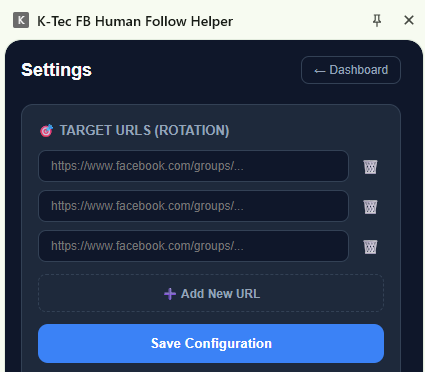
This is where you build your URL rotation list. Add multiple Facebook page URLs that you want the extension to cycle through during a session.
How to add URLs:
- Click “➕ Add New URL”
- Paste the full Facebook page URL into the input field
- Repeat for each URL you want to add
- Click “Save Configuration”
Pro tip: Add 3–5 different group pages or profile lists to give the extension a rich pool of users to follow. This also diversifies your follow activity across multiple pages, which looks much more natural to Facebook’s detection systems.
🔐 License Activation
- Your Device ID is shown in the license box. Click the 📋 button to copy it.
- Send the Device ID to K-Tec support via Facebook: facebook.com/ktecsl
- Once you receive your activation key, paste it into the “Enter Key…” field
- Click “Unlock”
- The status badge will change from 🔴 Locked to 🟢 Unlocked
7. Frequently Asked Questions (FAQ) {#faq}
❓ Is K-Tec FB Human Follow Helper safe to use?
Yes — when used responsibly. The extension is designed with safety as its #1 priority. Its human-like behaviour, randomised delays, fatigue logic, and page rotation all work together to keep your account safe. However, no automation tool can provide a 100% guarantee. Always start with low follow limits (20–30 per day) and increase gradually.
❓ Will this get my Facebook account banned?
The risk is minimised by the extension’s human simulation features. Unlike basic bots that click at machine speed, K-Tec mimics real human behaviour at every step. Follow within reasonable daily limits and you significantly reduce any risk.
❓ Does it work on Facebook Groups and Pages?
Yes. The extension works on any Facebook URL that contains “Follow” buttons — including public group member lists, public page followers, search results, and news feeds.
❓ How many follows per day is safe?
A safe and widely recommended range for new accounts is 20–50 follows per day. For established accounts with good standing, you can gradually increase this to 100–150 per day. The extension supports up to 500 per session, but always exercise caution.
❓ Do I need to keep my computer on while the extension is running?
Yes. The extension runs inside your Chrome browser, so Chrome must remain open and active while the session is running.
❓ Can I run the extension while using Facebook normally?
Yes. The extension’s side panel design means you can continue browsing Facebook normally while the extension runs. However, navigating away from the target URL will cause the extension to pause (by design) until you return.
❓ How do I get a license key?
Contact K-Tec on Facebook at facebook.com/ktecsl. Share your Device ID (found in Settings) and complete the Rs 500 payment. You will receive your activation key within a short time.
❓ Is the license tied to one device?
Yes. Each license key is generated for a specific Device ID and will only work on that device. This protects the integrity of the software.
8. Final Verdict {#verdict}
K-Tec FB Human Follow Helper is one of the most thoughtfully engineered Facebook follow automation tools available today. What makes it exceptional is not just what it does — but how it does it.
The combination of:
- ✅ Human-like scroll & click simulation
- ✅ Randomised fatigue & break patterns
- ✅ Multi-URL page rotation with jitter
- ✅ Comment section mining
- ✅ Real-time statistics & activity logging
- ✅ Intelligent feed sorting
- ✅ Clean abort & extension reload handling
…makes this a genuinely professional-grade tool, not a weekend side project.
If you are serious about growing your Facebook audience safely and efficiently, K-Tec FB Human Follow Helper is the tool you have been looking for.
📩 Contact & Purchase: 👉 facebook.com/ktecsl 💰 Price: Rs 500 $2 / year 🔒 License: Device-locked, 1-year validity





Leave a Reply